
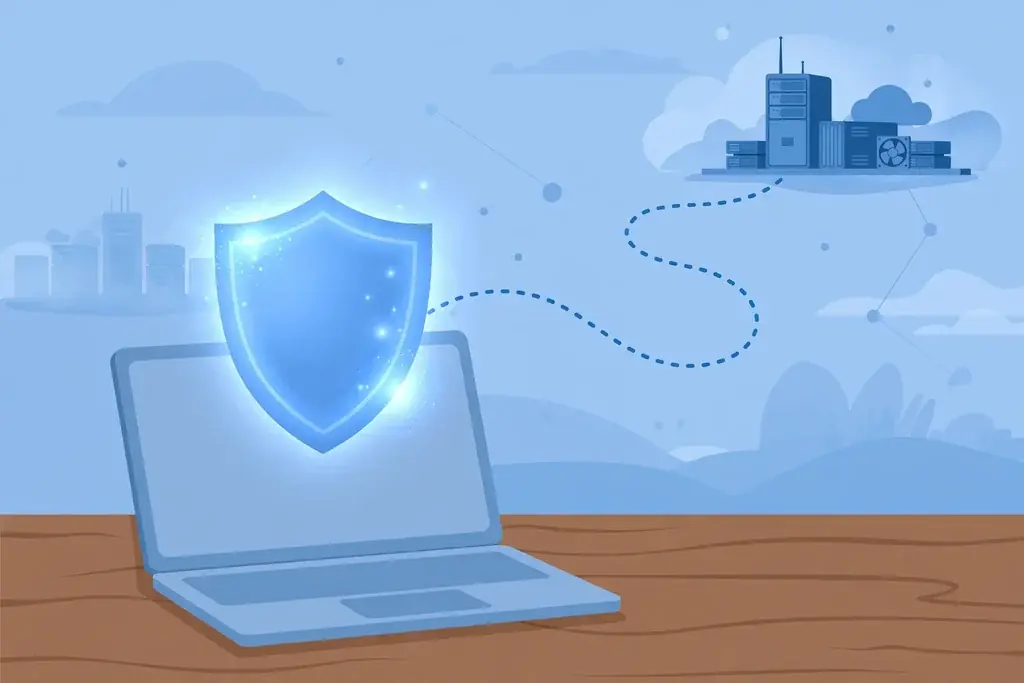
What Is a VPN and Do You Need One? A Plain-English Guide
Every few months, another advertisement insists that you need a VPN or your private life is exposed. The claims are loud, the jargon is thick, and the truth is quieter than either side admits. So what is a VPN and do you need one? In plain English, a VPN — a virtual private network — creates an encrypted tunnel between your device and a server run by the VPN provider, hiding your internet activity from the local network and your internet provider. It is a genuinely useful tool in some situations, unnecessary in others, and it is not the invisibility cloak the advertisements imply. Here is what it actually does, what it does not, and how to decide.
What a VPN Actually Is
Normally, when your phone or laptop connects to the internet, your traffic travels through your local network — your home router, a café's Wi-Fi, a hotel network — and then through your internet service provider (ISP) on its way to the websites and services you use. Anyone operating the local network can see which sites and services your device connects to, and your ISP can see it too. Your traffic itself is often encrypted by the website (that is what the padlock and HTTPS mean), but the destinations are still visible.
A VPN changes the route. You install an app, choose a server location, and connect. From that moment, your traffic travels first through an encrypted tunnel to the VPN provider's server, and only then out to the open internet. To the café Wi-Fi owner, your traffic looks like an unreadable stream going to one destination: the VPN server. To your ISP, the same: it can see that you are connected to a VPN server and how much data you are sending, but not which sites you visit. Websites you visit, meanwhile, see the VPN server's IP address rather than your own, so your apparent location changes to wherever that server sits.
What a VPN Hides — and From Whom
It helps to be specific, because "privacy" is doing too much work in most VPN advertising. A VPN hides your browsing destinations from the operator of the local network. On public Wi-Fi — a café, an airport, a hotel — that is a real benefit, because you do not know who runs that network or who else is on it. A VPN also hides your browsing destinations from your ISP, which is the company that would otherwise have a complete log of the sites you visit. For people who object to that visibility on principle, or who live somewhere with heavy network monitoring, that matters.
A VPN also changes your apparent location, which has legitimate uses: accessing your home country's services while travelling, or using a work network that requires a VPN connection to reach internal resources. Many employers provide their own VPN for exactly this purpose — not to hide activity, but to extend the office network securely to an employee's home or laptop. That is the original, business meaning of a virtual private network, and it remains one of its most sensible uses.
What a VPN Does Not Do
Now the limits, which the advertisements tend to skip. A VPN does not make you anonymous. If you sign in to an account — your email, your social media, your bank — that service knows exactly who you are, VPN or not. Cookies and browser fingerprinting still track you across sites, and your VPN provider itself can now see what your ISP used to see. You have not removed the observer; you have moved it. That is why the provider's logging policy matters more than any speed claim: a provider that logs your activity can hand it over, sell it, or leak it, and you would be worse off than before.
A VPN does not replace antivirus software. If you download an infected file, a VPN will not stop it from infecting your device. It does not protect against phishing: if you type your password into a fake login page, the VPN dutifully encrypts the journey of your password straight to the scammer. It does not fix weak passwords, unpatched software, or careless sharing. And it does not usually make your internet faster — your traffic takes a detour through an extra server, so speed typically drops a little, sometimes noticeably on distant servers.
When You Probably Do Need One
A VPN earns its keep in a few clear situations. If you regularly use public Wi-Fi — cafés, airports, hotels, libraries — a VPN adds a meaningful layer of protection against snooping on networks you do not control. If you want to limit what your ISP can see about your browsing, a VPN is the only straightforward tool that does it. If you travel and need to reach services from home, or your employer requires a VPN for remote work, it is not optional at all — it is the mechanism.
In these cases, choose a reputable provider with a clear no-logs policy, pay for it rather than using a free service, and set it up before you need it — ideally at home, on a trusted network, so you are not configuring security software on the very network you are worried about. A VPN you understand and actually use beats a premium subscription you never switch on.
When You Probably Do Not
If your internet life happens mostly on a trusted home network, and the sites and apps you use already encrypt their traffic with HTTPS — which nearly all major sites and apps now do — a VPN adds relatively little. Your ISP can still see which sites you visit, but it cannot read the content of your encrypted traffic, and on a home network you control, the local snooping risk a VPN guards against largely does not exist. For basic home browsing, the fundamentals matter more: strong, unique passwords, two-factor authentication on important accounts, regular software updates, and a healthy suspicion of unexpected login pages.
Be especially sceptical of free VPNs. Running servers costs money, and a free service has to pay for them somehow. Often that means advertising, selling usage data, or injecting tracking of its own — the very things a paying customer is trying to escape. A free VPN can be worse than no VPN, because it concentrates your traffic in the hands of a provider whose business model depends on exploiting it. If a VPN's price is zero, ask what the product is. It may be you.
How to Choose, If You Decide to Get One
Start with the logging policy: look for a provider that states plainly that it keeps no logs of your activity, and ideally one that has had that claim independently audited. Check that it offers apps for the devices you actually use, and that it is easy to switch on — a VPN that is fiddly to enable will sit unused. Look for a kill switch, a feature that blocks all internet traffic if the VPN connection drops, so your real connection is never briefly exposed. And be realistic about location claims: streaming services actively block many VPN servers, and a VPN does not guarantee access to any particular catalogue.
Finally, keep the tool in proportion. A VPN is one layer of online safety, not the whole system. It sits alongside the basics — updated software, strong passwords, two-factor authentication, and caution about phishing — not instead of them. Used for a specific reason, on networks you do not trust, it is a sound, sensible tool. Bought out of fear from an advertisement, it is an expensive way to feel safer without being safer.
Quick Summary
A VPN creates an encrypted tunnel between your device and a VPN server, hiding your browsing destinations from the local network and your ISP and changing your apparent location. It is worth it on public Wi-Fi, for limiting ISP tracking, and for remote work access. It does not make you anonymous, does not replace antivirus, and does not protect against phishing or weak passwords. On a trusted home network with HTTPS everywhere, it is optional — and free VPNs deserve scepticism, since they often pay their costs with your data or attention.
Frequently Asked Questions
What does VPN stand for?
Virtual private network. It is a service that routes your internet traffic through an encrypted tunnel to a remote server run by the VPN provider, hiding your activity from the local network and your ISP and changing the IP address websites see.
Does a VPN make me completely anonymous online?
No. If you sign in to an account, that service knows who you are regardless of VPN use, and cookies and browser fingerprinting still work. A VPN also moves visibility from your ISP to the VPN provider, so the provider's logging policy matters enormously.
Do I need a VPN on my home Wi-Fi?
Usually not as a first priority. On a trusted home network, with HTTPS encrypting most web traffic, a VPN adds relatively little. Strong passwords, two-factor authentication, and software updates matter more for home safety than a VPN subscription.
Are free VPNs safe to use?
Be sceptical. Running VPN servers costs money, and free services often pay for them through advertising, selling usage data, or extra tracking — the very things users want to escape. A free VPN can leave you worse off than no VPN at all.
Related Guides
- What Is Phishing: 5 Smart Ways to Spot and Stop Online Scams
- What Is Two-Factor Authentication? 7 Powerful Reasons to Enable It Now
- How to Verify Information Found Online: 10 Proven Ways to Check Any Claim
External Resources
More in Tech Help
How to Ask Better Questions Online: 9 Powerful Ways to Get Clearer Answers
How to Ask Better Questions Online: 9 Powerful Ways to Get Clearer Answers Many poor online answers begin with a question that is too broad, incomplete, or difficult to understand. Search engines, AI…
How to Verify Information Found Online: 10 Proven Ways to Check Any Claim
How to Verify Information Found Online: 10 Proven Ways to Check Any Claim A screenshot, headline, short video, or confident AI answer can look convincing while leaving out the evidence that matters…
Best Websites for Reliable Information: 15 Trusted Sources Worth Bookmarking
Best Websites for Reliable Information: 15 Trusted Sources Worth Bookmarking The best source depends on the question. A space mission calls for NASA, a Canadian population question calls for…